Note: The EA Form in Worksy is for reference only. Employees are still required to complete e-Filing on the LHDN portal.
Any changes related to payroll or PCB calculation will be reflected in the EA Form as long as they are updated before the final payroll processing for December of that year.
In the Employee Profile > Income Tax section, you’ll see the Number of Dependent Children (Income Tax Relief) field with two options: Manual and Auto. Each option is used for different situations.
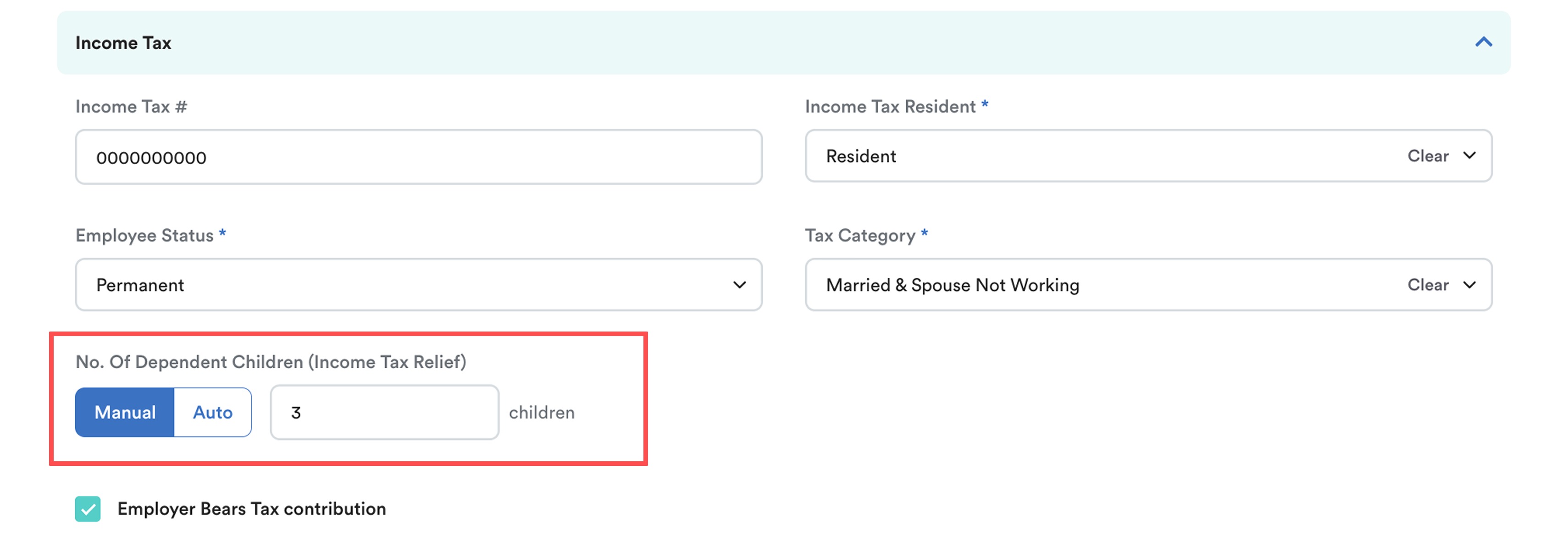
Manual
Use for simple cases where:
All dependent children are non-disabled
All children are below 18 years old
For these cases, the child relief calculation is fixed and straightforward, so you can directly enter the number of children without further categorisation.
Auto
Use when the employee has children under different eligibility categories and you want the system to calculate the tax relief accurately based on those categories.
The system will calculate child relief according to the selected Child Category, such as:
Children aged 18 and above who are studying full-time
Children aged 18 and above receiving full-time education at diploma level or higher:
In Malaysia (diploma level onwards)
Outside Malaysia (degree level onwards)
Disabled children certified by the Department of Social Welfare
Disabled children receiving full-time education at diploma level or higher (Malaysia or outside Malaysia)
LHDN Compliant Formula
According to LHDN guidelines, each eligible child is entitled to RM 2,000 in child tax relief.
To ensure compliance with LHDN requirements, the system calculates the number of children using the following formula:
Child Count = Tax Relief Amount ÷ RM 2,000
This number will also reflect accordingly on EA form A8 after payroll process.
| Category | Tax Relief Amount (per child) | Equivalent Child Count (Based on RM 2,000 per Child) |
| Child below the age 18 years. | RM2,000 | 1 |
| Children over the age of 18 years studying full time. | RM 2,000 | 1 |
| Children over the age of 18 years and receiving full-time instruction at diploma level onwards in an institution of higher education in Malaysia or degree level onwards in an institution of higher education outside Malaysia. | RM 8,000 | 4 |
| Disabled children as certified by the Department of Social Welfare. | RM 6,000 | 3 |
| Disabled children receiving full-time instruction at diploma level onwards in an institution of higher education in Malaysia or degree level onwards in an institution of higher education outside Malaysia. | RM 14,000 | 7 |
TABLE OF CONTENTS
A. Manual Method for Child Income Tax Relief
B. Auto Method for Child Income Tax Relief
Example (100% column)
Example of EA Form A8 Display
Example (50% column)
A. Manual Method
Step 1
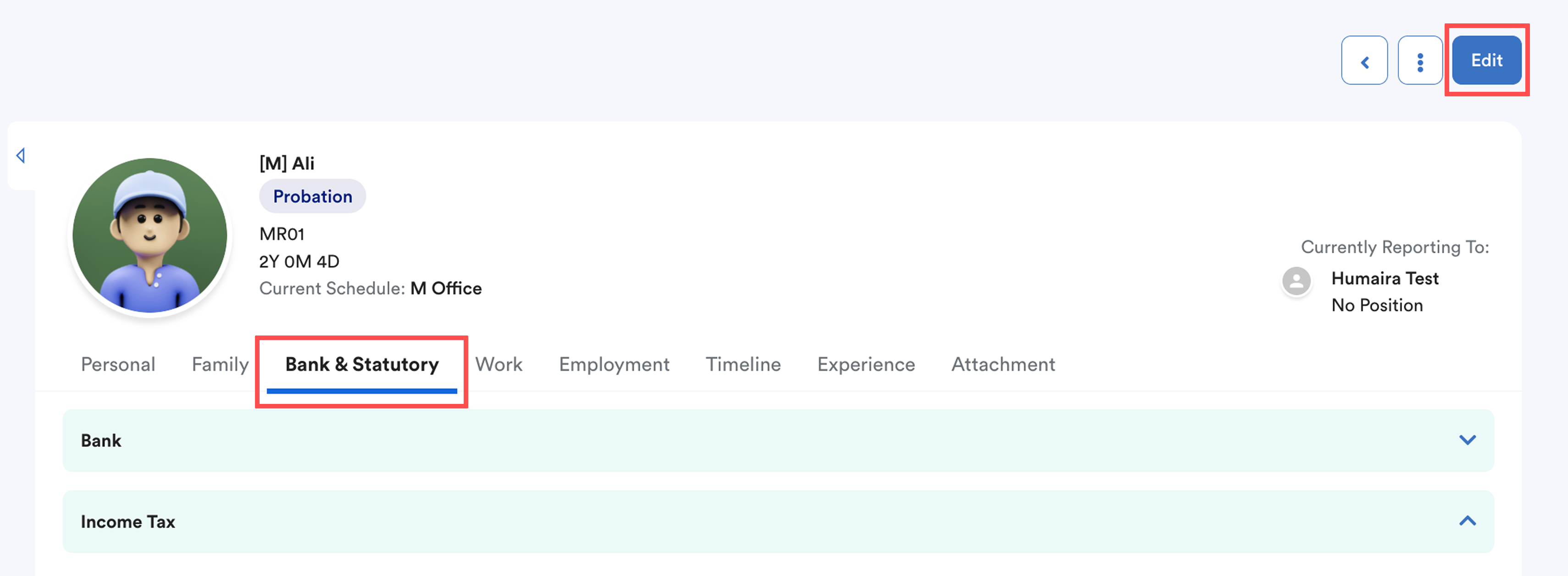
From the left menu, go to Employee > Directory and select the employee.
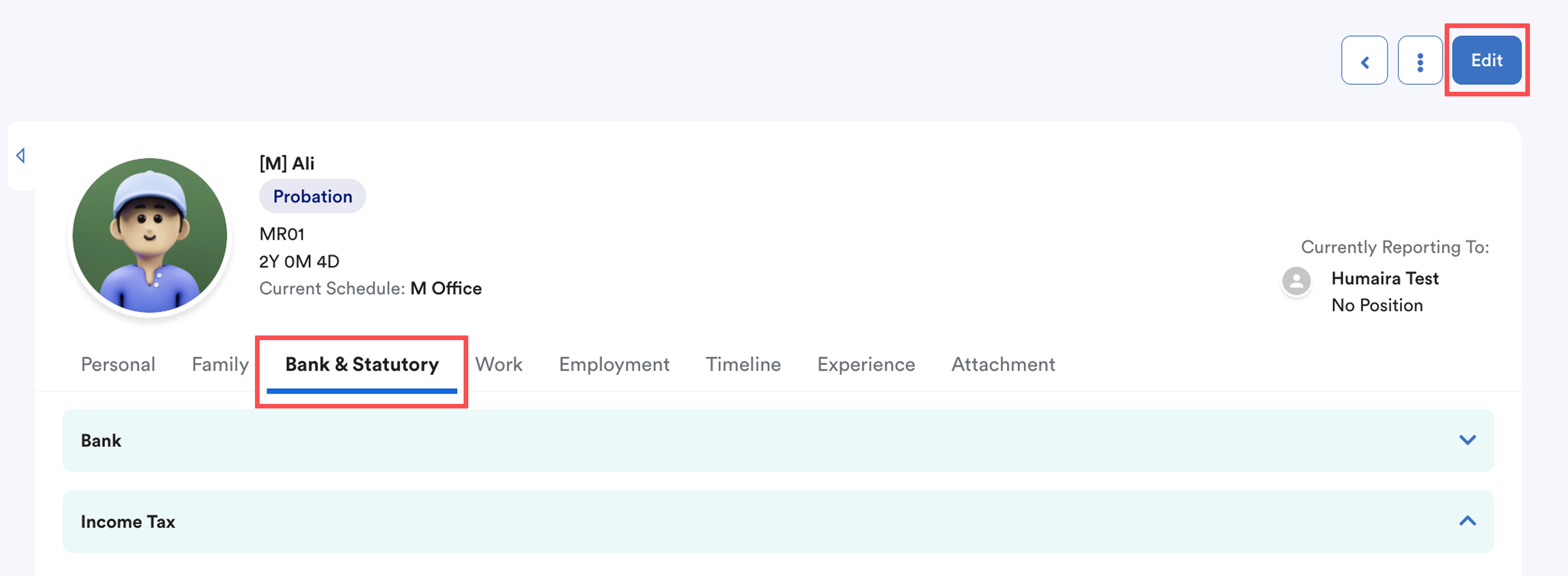
Next, navigate to the Bank & Statutory tab and click Edit.
Step 2
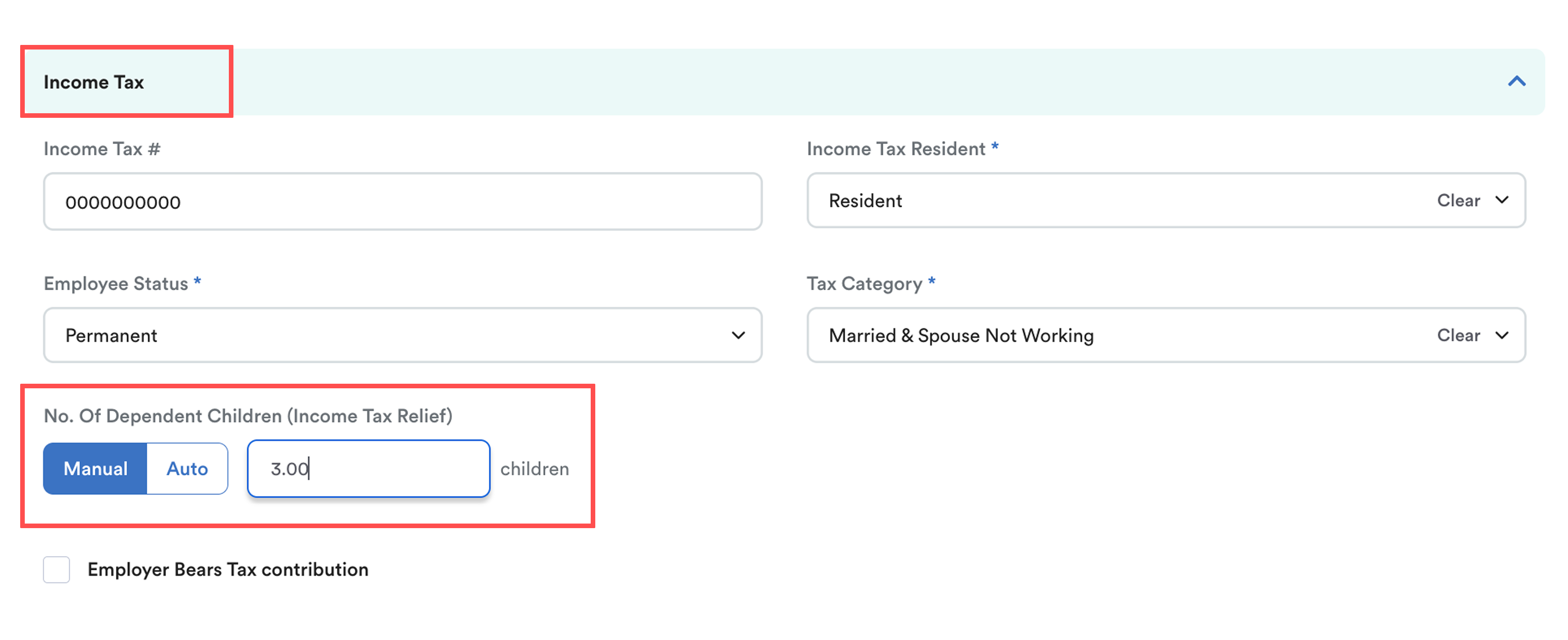
Under the Income Tax section, select Manual and key in the number of children.
Step 3
The number of children recorded will automatically affect the employee’s total qualifying child tax relief.
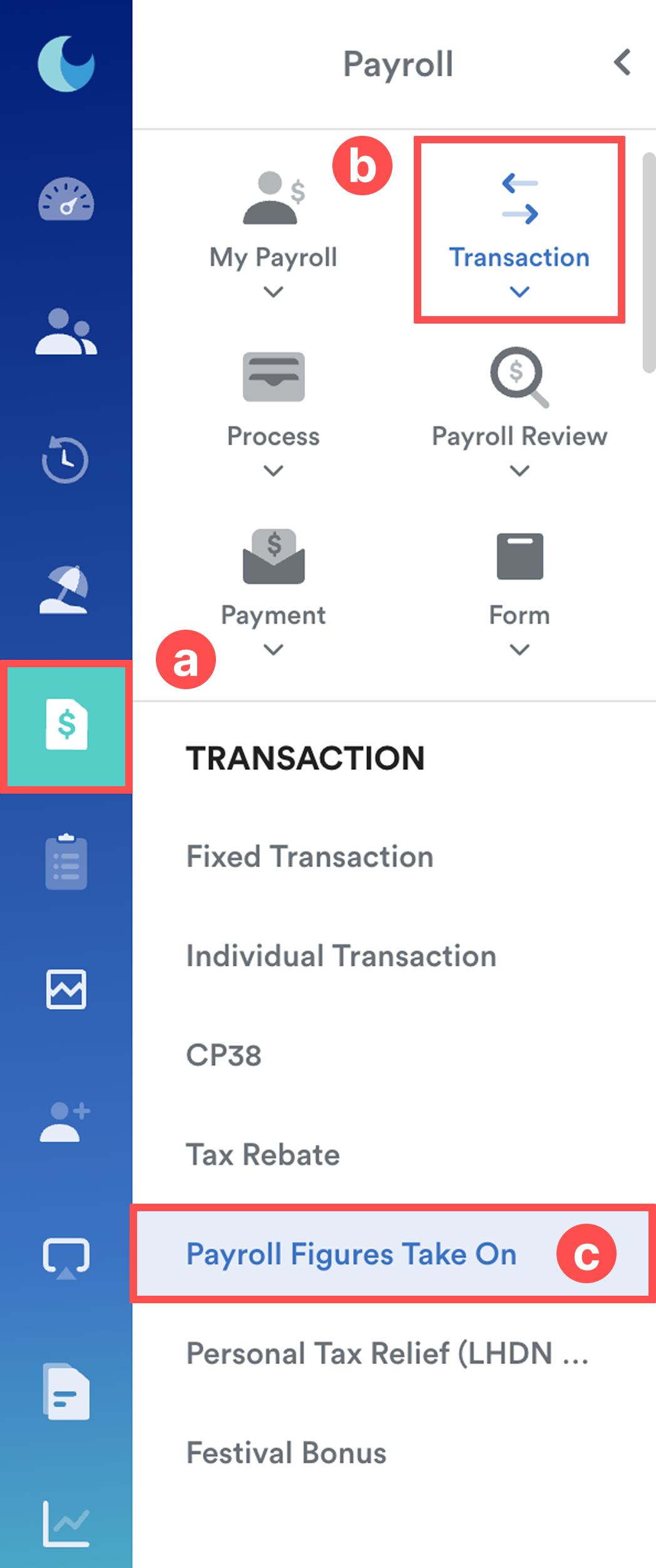
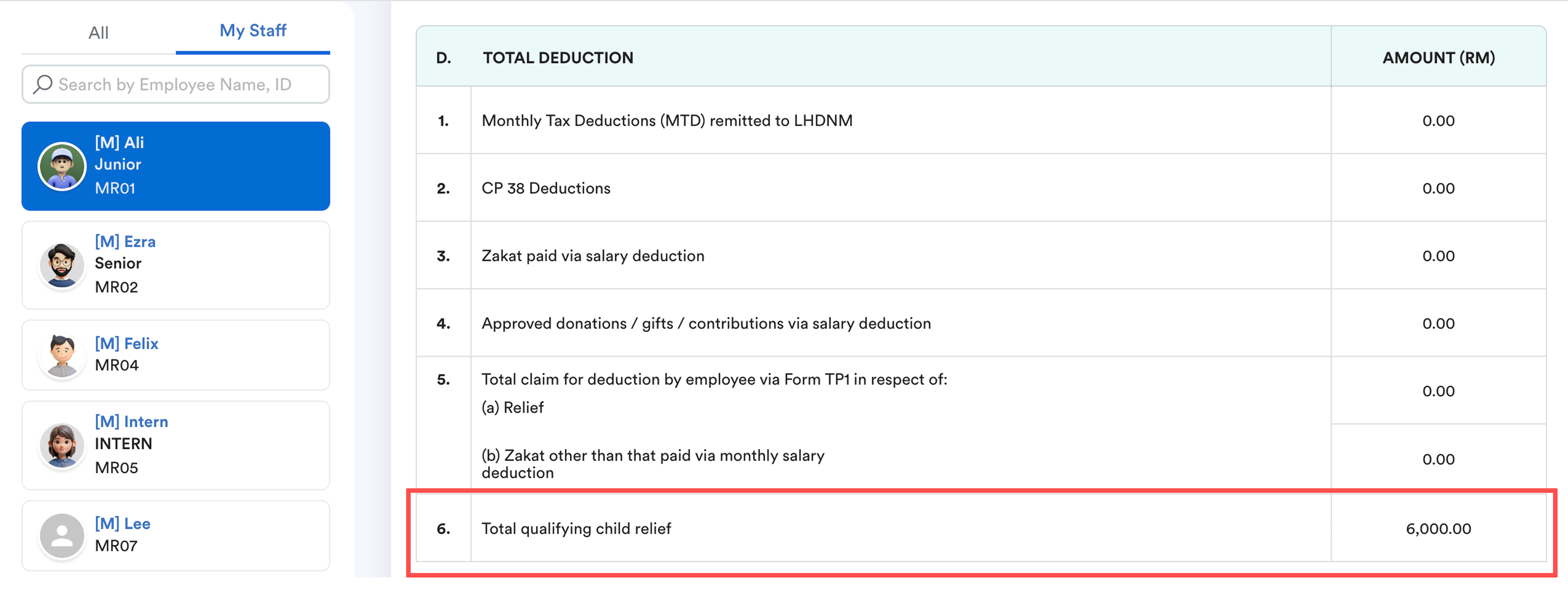
To view the calculated amount, go to Payroll (a) > Transaction (b) > Payroll Figures Take On (c).
Step 4
Select the employee and scroll down to Section D: Total Deduction.
Under 6. Total qualifying child relief, the tax relief amount will be displayed based on the number of children entered in Step 2.
Note: This field is system-calculated and cannot be edited.
Example
1 child → RM 2,000 tax relief
3 children → RM 6,000 tax relief
B. Auto Method
Step 1
From the left menu, go to Employee > Directory and select the employee.
Next, navigate to the Bank & Statutory tab and click Edit.
Step 2
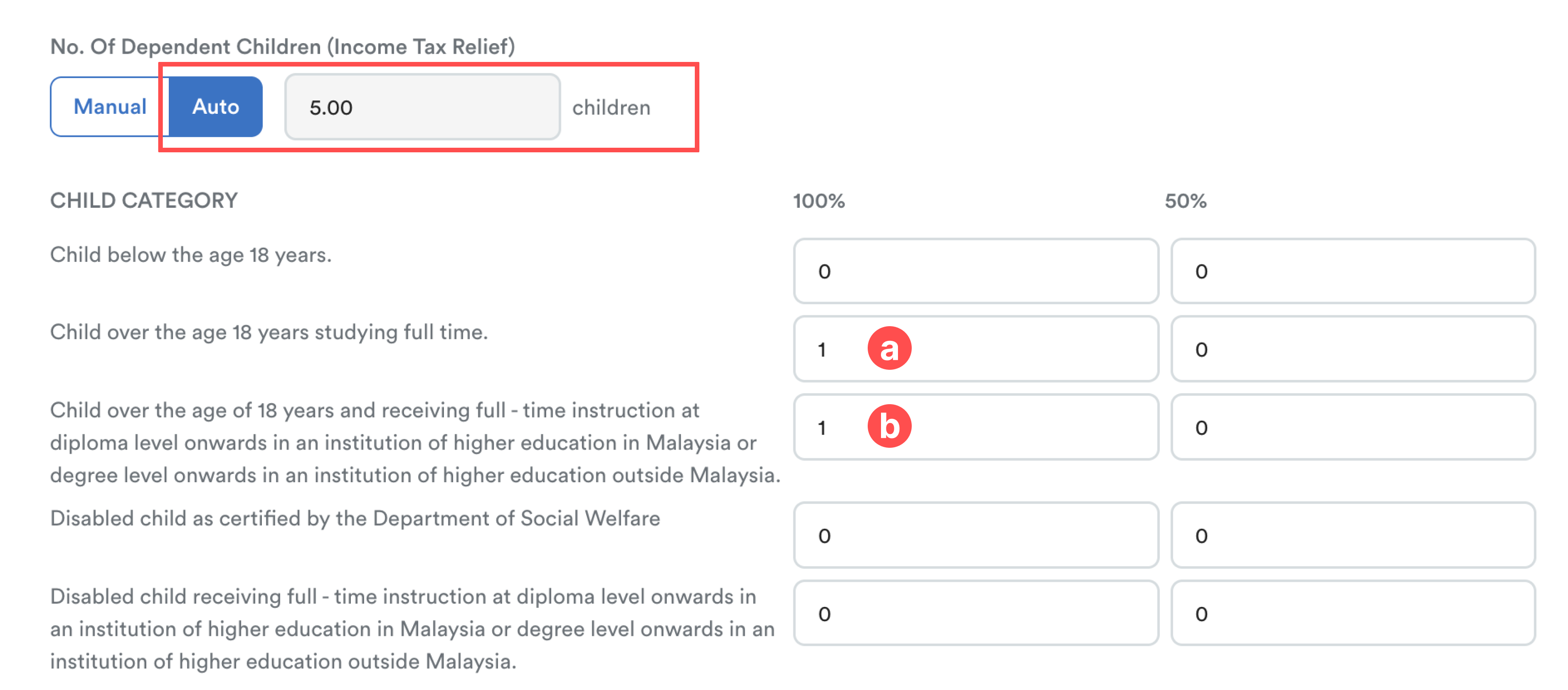
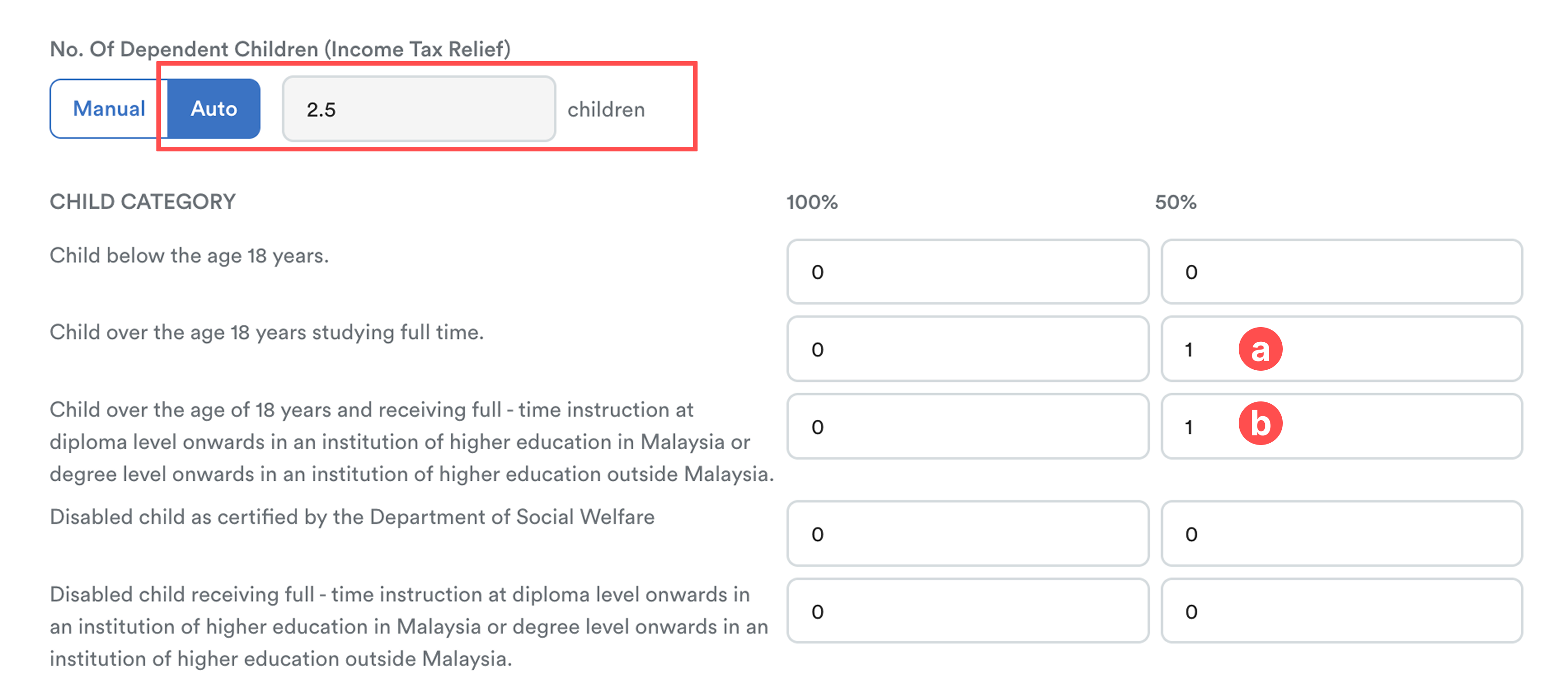
Under the Income Tax section:
Select Auto
Enter the number of children under the relevant Child Category
Use the columns as follows:
100%: For children where the employee is fully entitled to the tax relief.
50%: For children where the tax relief is shared between spouses.
In Auto mode, the Total Children column reflects Equivalent Child Count for tax calculation purposes, not the actual number of children. Each child’s tax relief is converted into units based on RM 2,000 per child.
Example (100% column)
Child over the age of 18 years studying full-time: 1
Child over the age of 18 years and studying full-time in an institution of higher education in Malaysia: 1 → 4
Total children = 1 + 4 = 5
Example of EA Form A8 Display
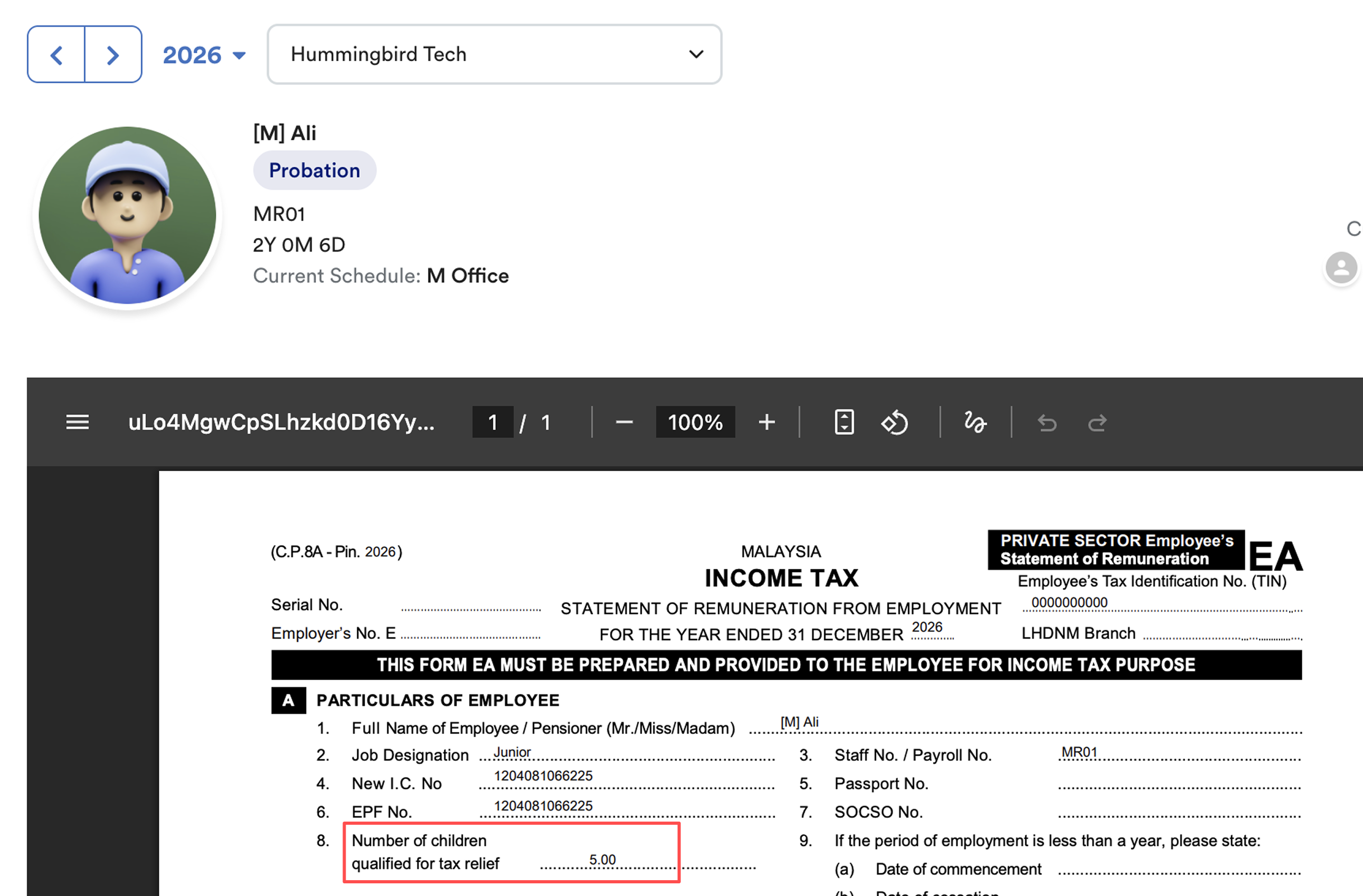
Note: The EA Form in Worksy is for reference only. Employees are still required to complete e-Filing on the LHDN portal.
Example (50% column)
Each child in the 50% column is halved to reflect shared tax relief between spouses.
- Child over the age of 18 years studying full-time: 1 → 0.5
- Child over the age of 18 years and studying full-time in an institution of higher education in Malaysia: 1 → 2
Total children = 0.5 + 2 = 2.5
Step 3
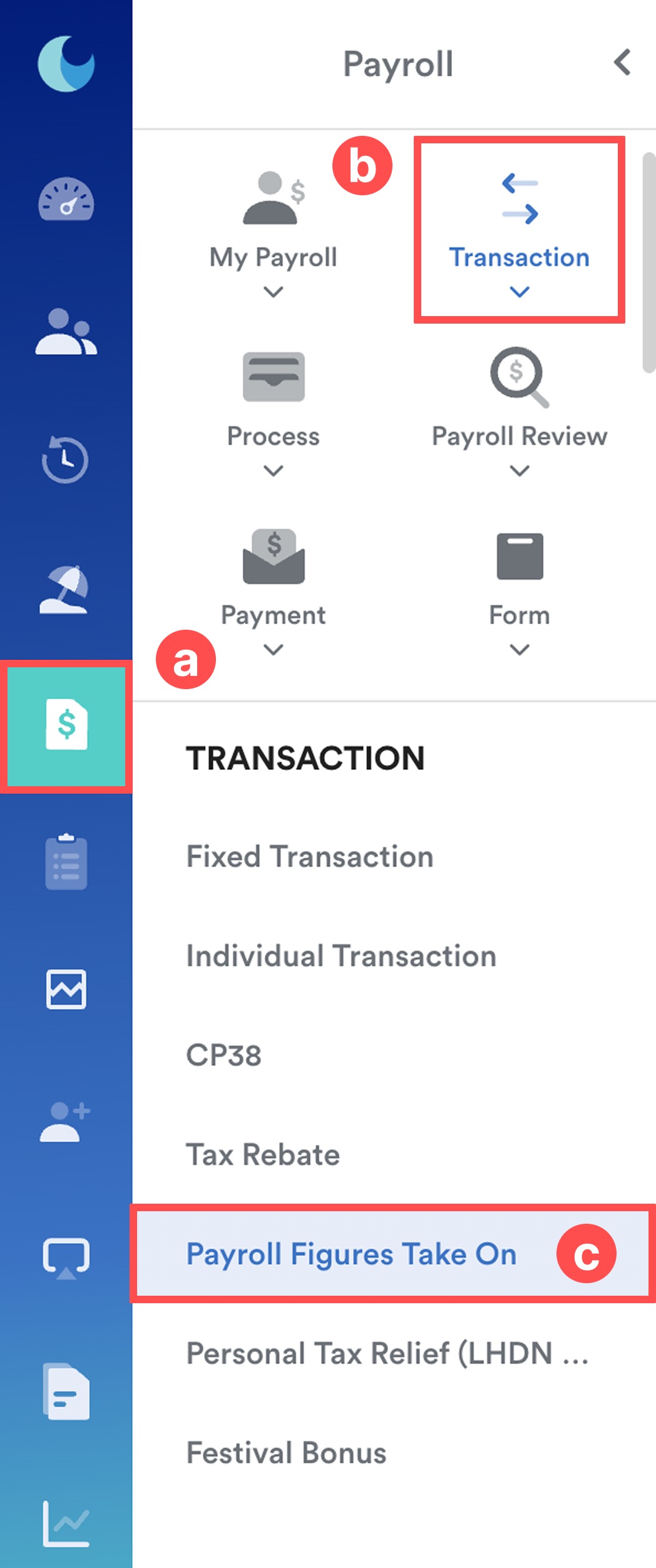
The number of children recorded will automatically affect the employee’s total qualifying child tax relief.
To view the calculated amount, go to Payroll (a) > Transaction (b) > Payroll Figures Take On (c).
Step 4
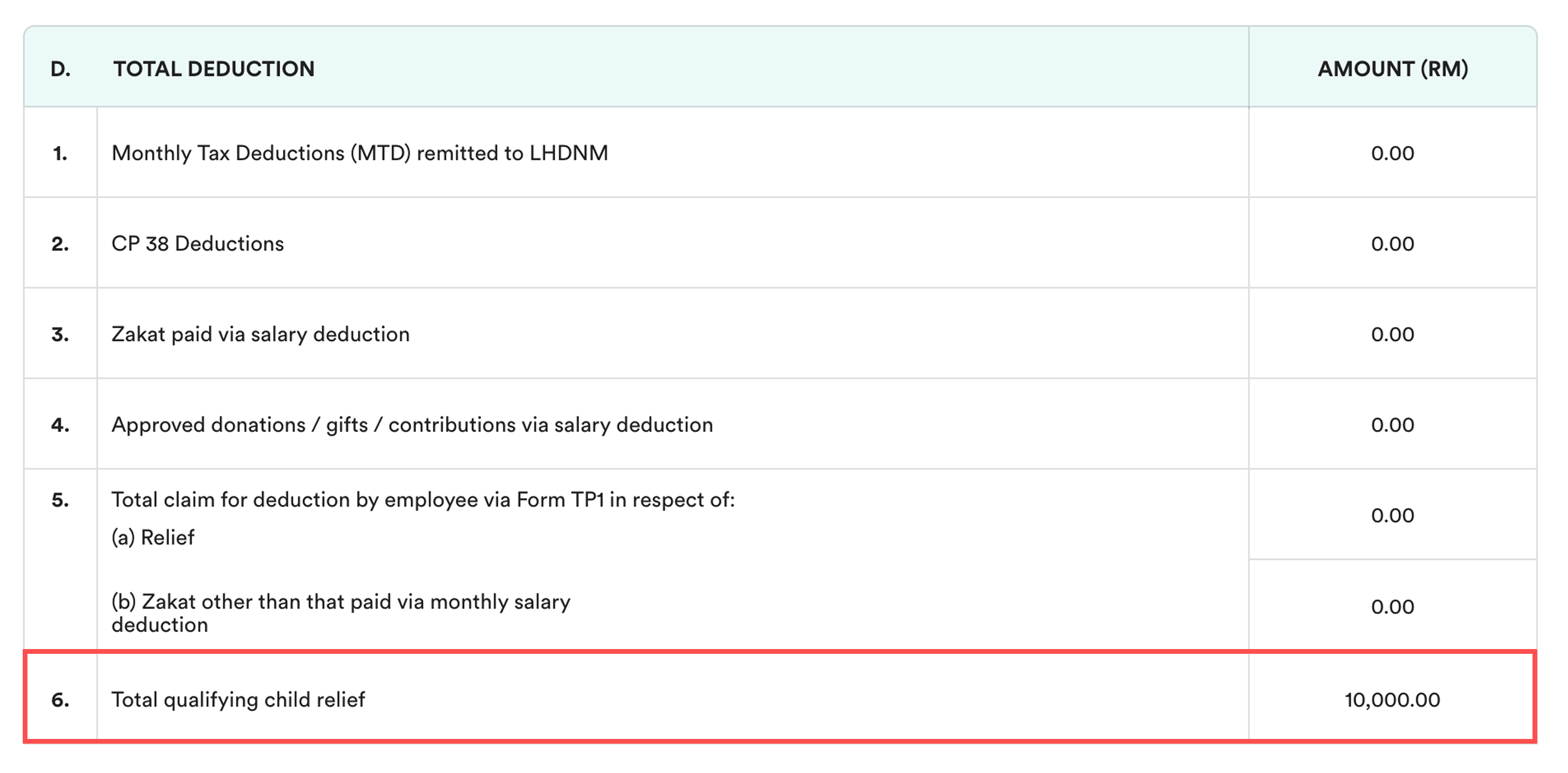
Select the employee and scroll down to Section D: Total Deduction.
Under 6. Total qualifying child relief, the tax relief amount will be displayed based on the number of children entered in Step 2.
Note: This field is system-calculated and cannot be edited.
Example A (100% column)
Child over 18 years studying full-time: 1
Child over 18 years in higher education (Malaysia): 1
Tax relief = RM 10,000
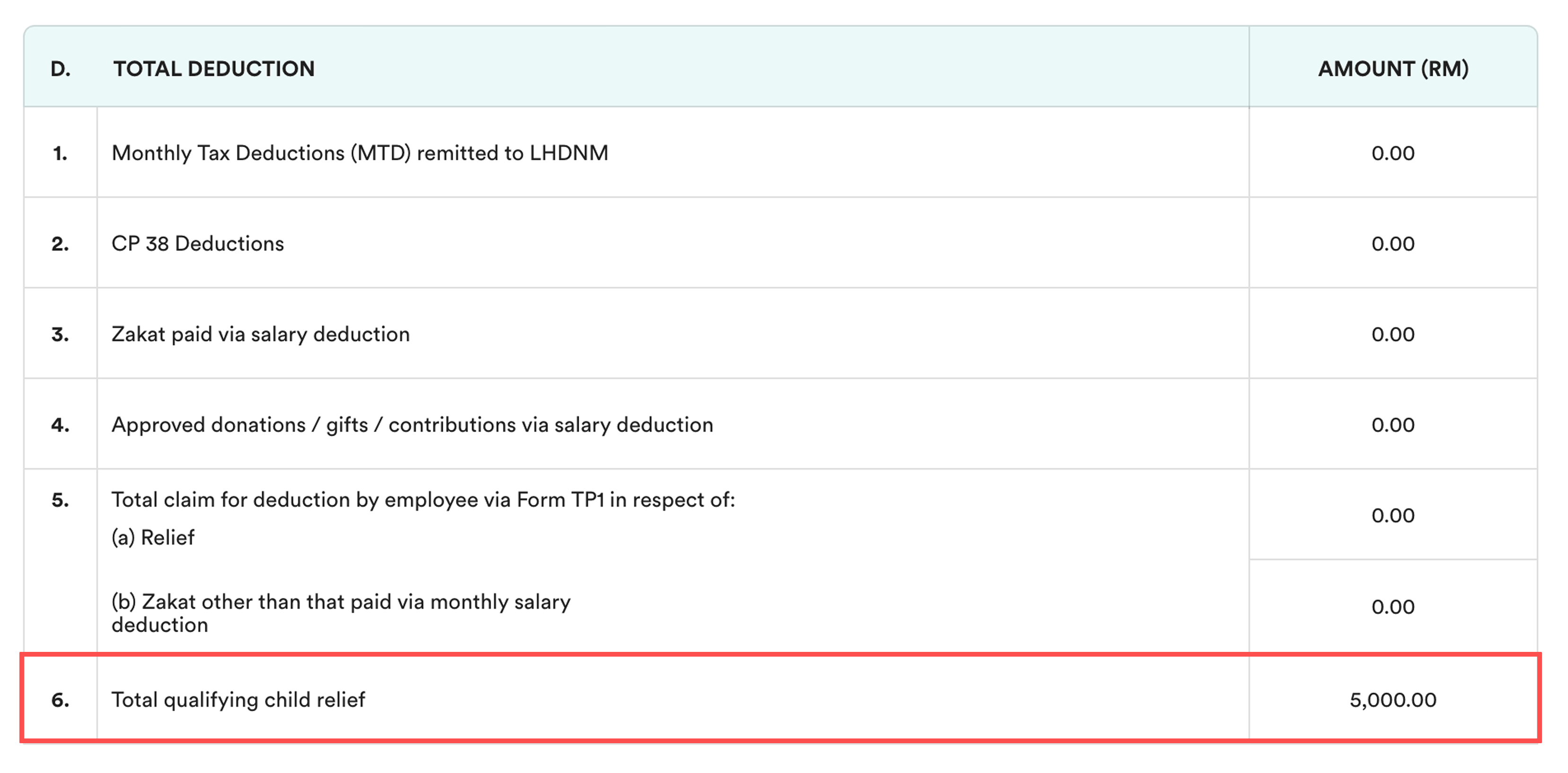
Example B (50% column – shared relief)
Same children entered under 50% column
Each child’s relief is halved
Tax relief = RM 5,000
C. Summary
Manual: Best for simple cases (all children below 18, non-disabled)
Auto: Best for complex cases (children aged 18+, studying tertiary education, disabled, or mixed categories)
Related:
We hope this explanation clarifies the matter. If you require additional assistance, do not hesitate to contact our support team.
Was this article helpful?
That’s Great!
Thank you for your feedback
Sorry! We couldn't be helpful
Thank you for your feedback
Feedback sent
We appreciate your effort and will try to fix the article