EIS and SOCSO contributions are statutory deductions for eligible employees in Malaysia.
1. SOCSO (Contribution Rate of Act 4)
3. Common Reasons Why SOCSO/EIS Is Not Deducted
- Reason #1: Incorrect Birth Date in Employee Profile
- Reason #2: No Prior Contribution History Before SOCSO/EIS Eligibility Cut-Off Age
- Reason #3: New Hire Joined Mid-Month
1. SOCSO (Contribution Rate of Act 4)
SOCSO contributions are based on the Third Schedule of the Employees' Social Security Act 1969, which uses a fixed table, not direct percentage calculation. Foreigner SOCSO contribution will follow as local.
Contribution Categories:
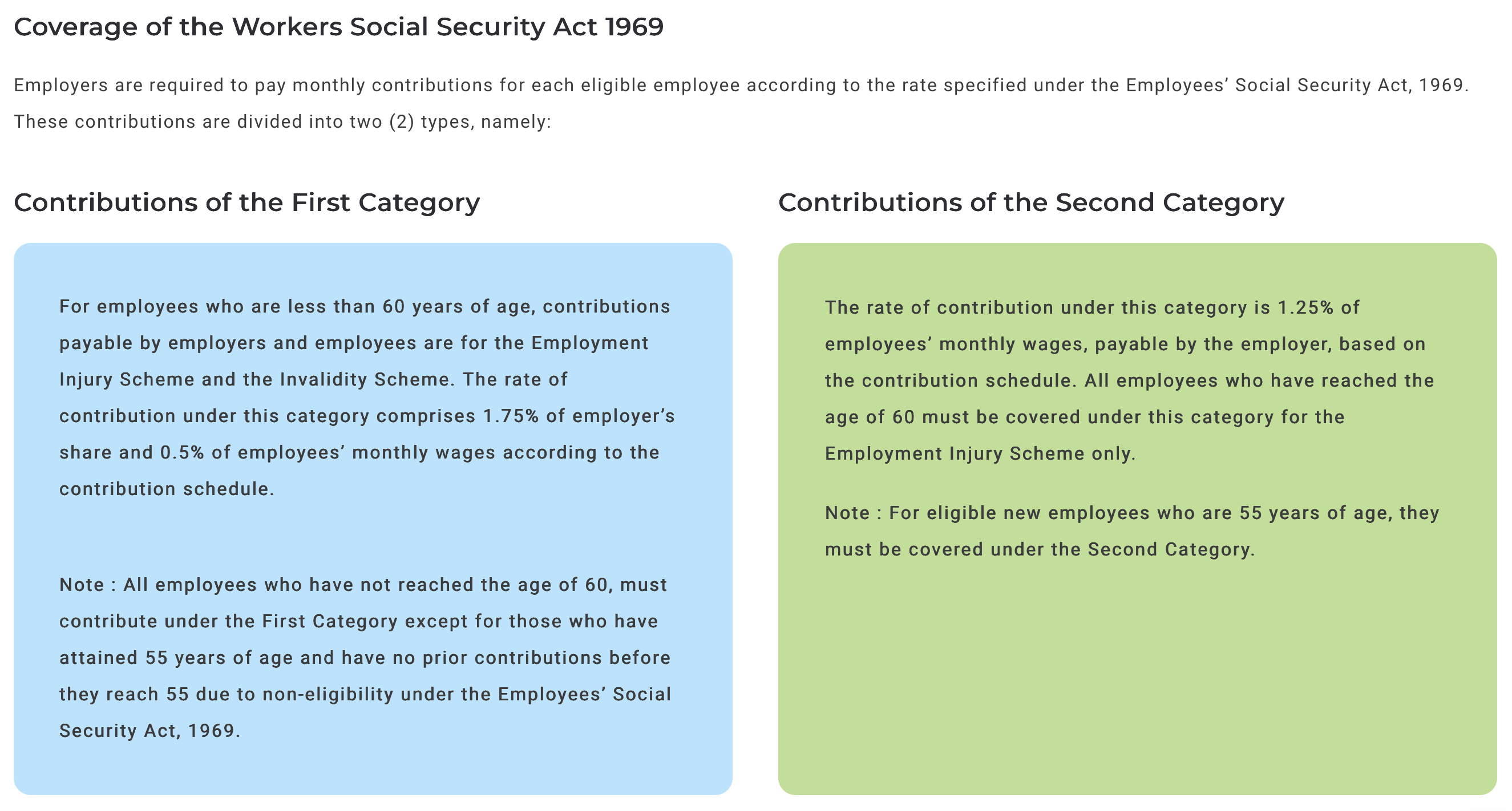
1. Category 1 (Under Age 60): Both employer and employee contribute. Covered under both Employment Injury Scheme and Invalidity Scheme,
- Employer Share: ~1.75% of monthly wages.
- Employee Share: ~0.5% of monthly wages (deducted from salary).
2. Category 2 (Age 60+ or 55 yrs without prior contribution): Only the employer contributes. Covered under the Employment Injury Scheme only.
- Employer Share: ~1.25% of monthly wages.
- Employee Share: 0%.
2. EIS (Contribution Rate of ACT 800)
- Malaysian citizen / permanent resident / temporary resident
- Aged 18~60
- Working in the private sector
- Employed under a contract of service
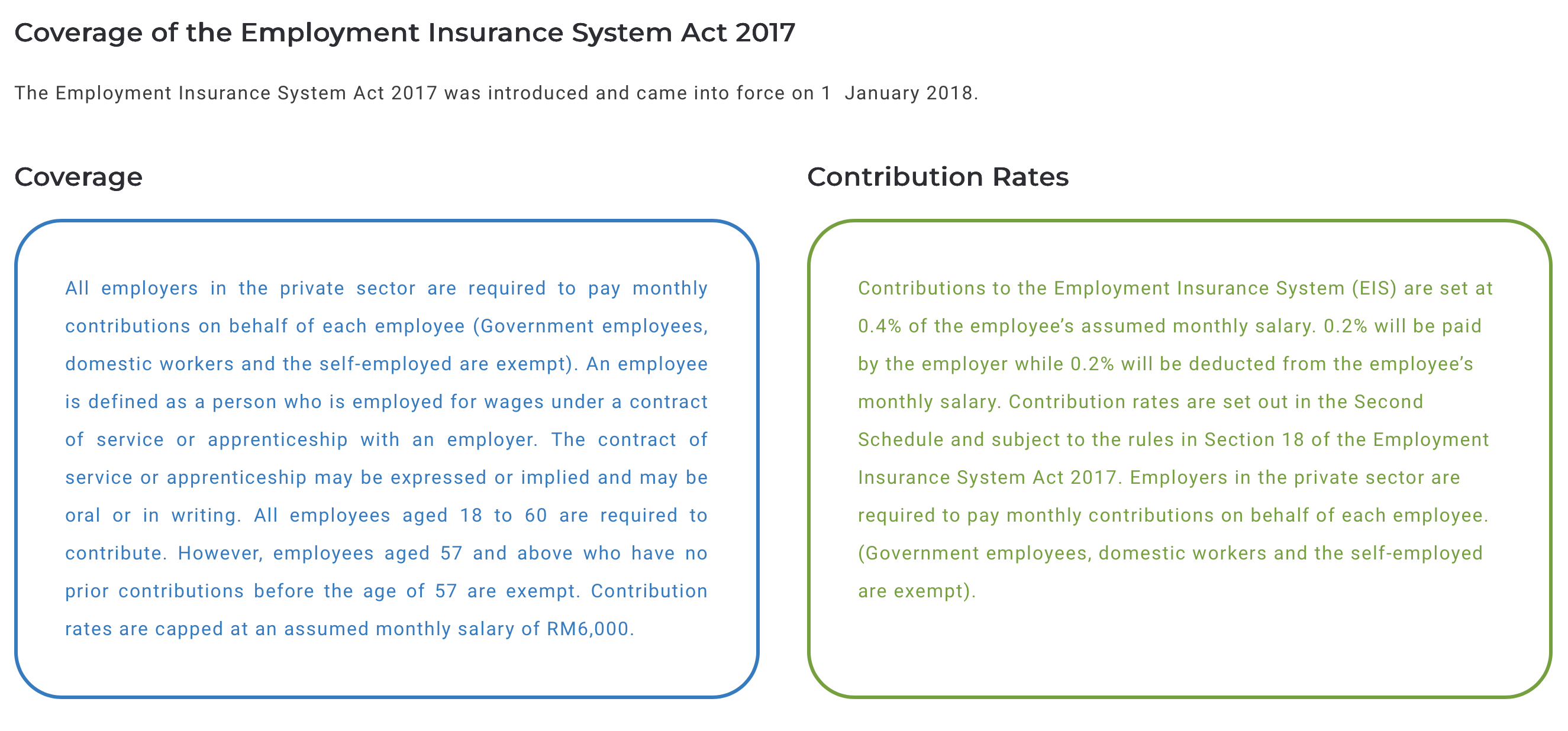
- Contribution Rate: Total 0.4% of monthly salary (0.2% Employer + 0.2% Employee). Refer to ACT 800.
- Salary Ceiling: Calculated up to a maximum monthly salary of RM6,000.
- Exemptions:Government employees, foreigners, domestic workers, self-employed, and workers aged 57 or older with no prior contributions before that age.
According to (Perkeso Guideline), this is the summary: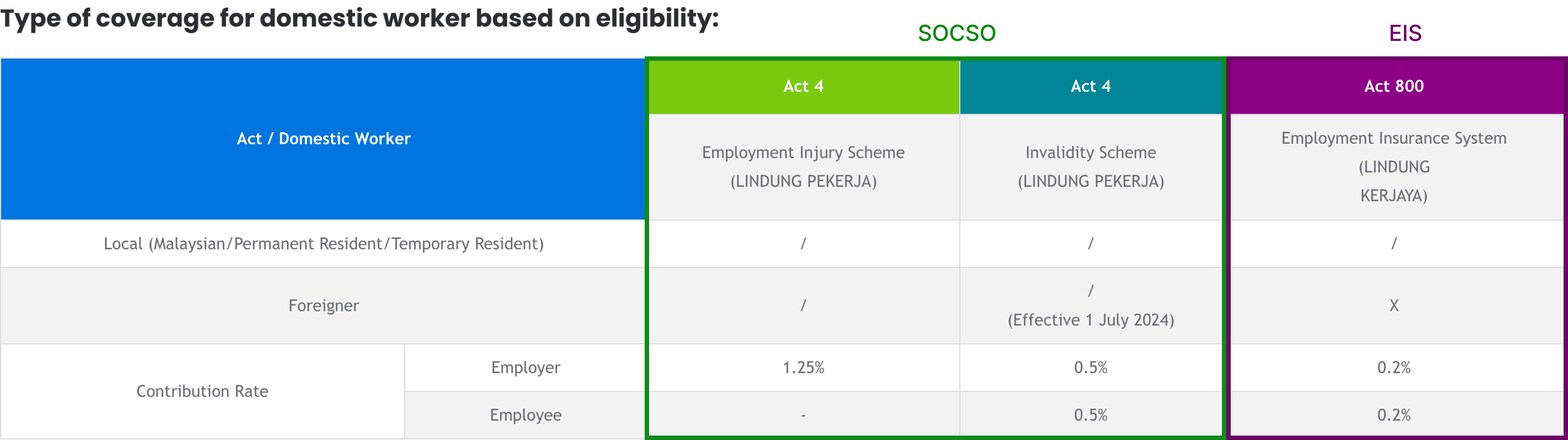
3. Common Reasons Why SOCSO/EIS Is Not Deducted
Below are the most common causes for missing EIS/SOCSO deductions in an employee's payslip. Use this list to help troubleshoot and resolve the issue.
Reason #1: Incorrect Birth Date in Employee Profile
EIS and SOCSO contributions depend on the employee's date of birth.
- If the employee is under 18: No EIS deduction
- If the employee is over 60: No EIS/SOCSO deduction
Solution: Check employee's birth date and ensure tally with their IC number
Step 1
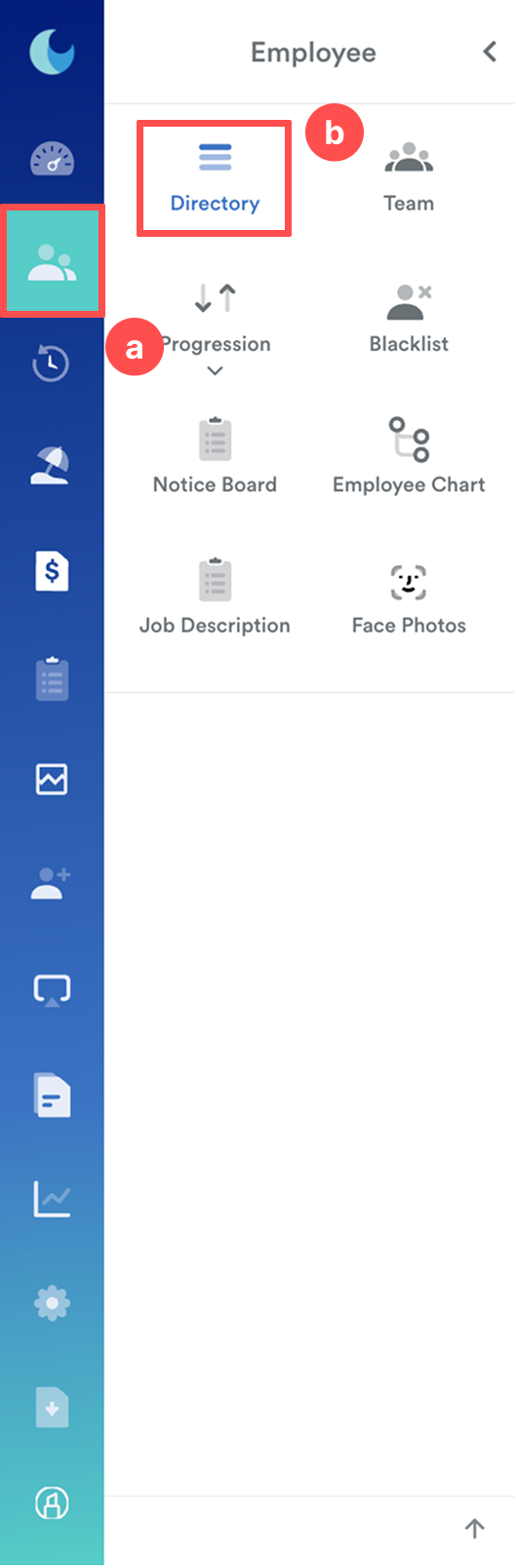
From the left menu, go to Employee (a) > Directory (b) > Choose employee.
Step 2
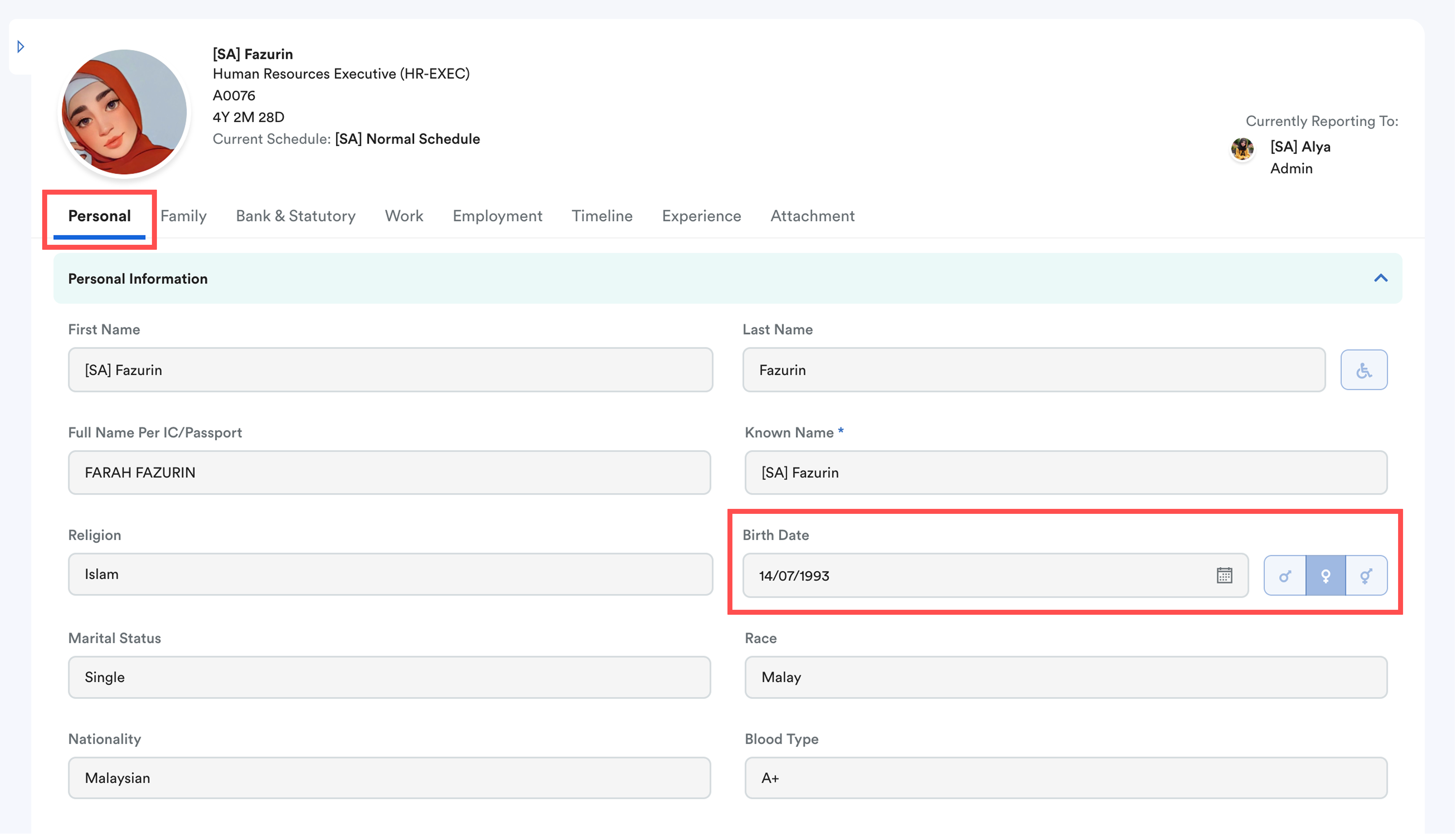
In the Employee Profile, view Personal tab. Check the IC number and ensure the Birth Date matches. Update if necessary and Save.
Step 3
Reprocess payroll for the employee.
Reason #2: No Prior Contribution History Before SOCSO/EIS Eligibility Cut-Off Age
- SOCSO: Employee aged 55 and above with no prior contributions before turning 55 fall under the Second Category, which is without the employee's contribution. (Refer to Contribution Rate of Act 4)
- EIS: As per PERKESO guidelines, employees aged 57 and above who have no prior contributions before age 57 are exempted from EIS contributions.
If there is no contribution history recorded in the Previous Employment Figures Take On (PEFTO) screen, Worksy system will treat them as a new employee, which will be exempted from EIS contribution.
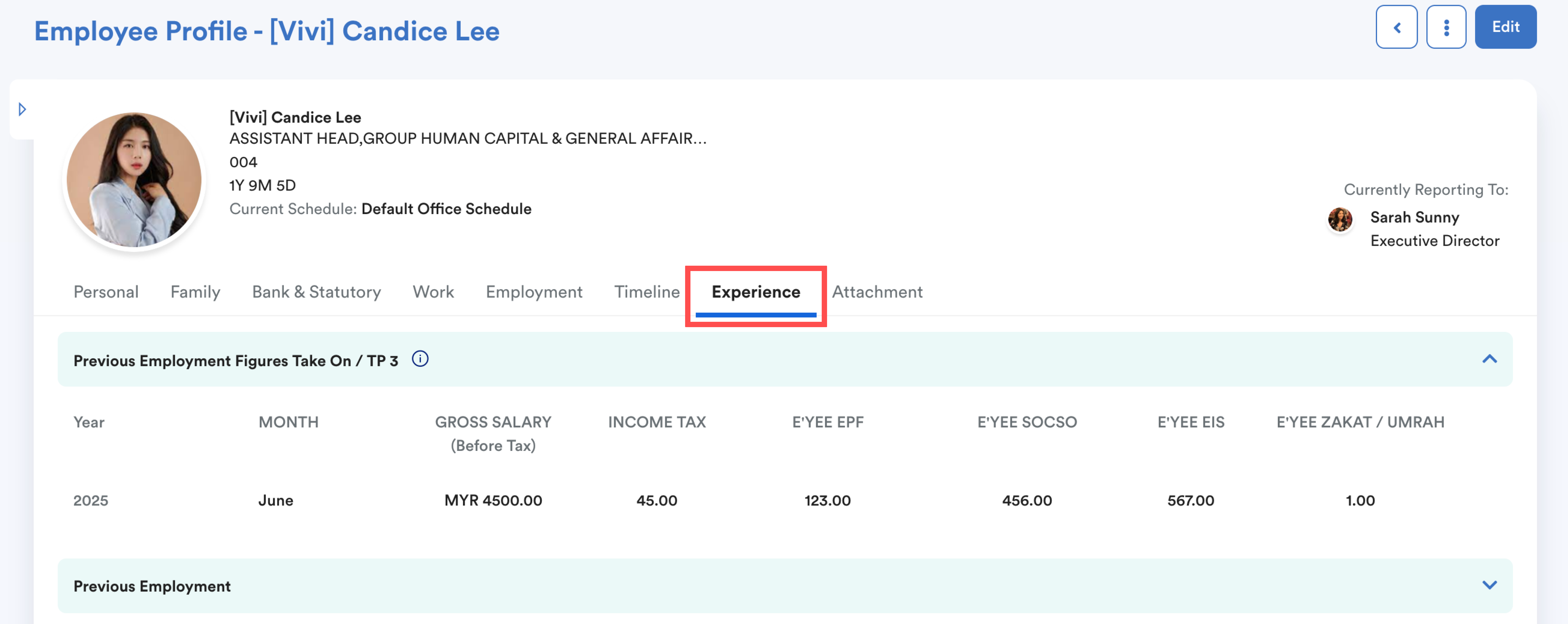
Solution:
Refer to Payroll Figures Take On (PFTO) & Previous Employment Figures Take On (PEFTO) for step-by-step instructions to enter the figures.Reason #3: New Hire Joined Mid-Month
SOCSO and EIS contributions are calculated based on wages paid within the payroll month.
If an employee joins in the middle of the month, the contribution amount is based only on their actual wages earned from their start date to the end of the month.
In some cases of very low partial-month wages, the amount may fall into a lower contribution category or appear as zero in the payslip.
Important Note:
Always refer to the latest SOCSO/EIS Contribution Schedule on the PERKESO website to determine the correct contribution category and wage base for your employee.
We hope this explanation clarifies the matter. If you require additional assistance, do not hesitate to contact our support team.
Was this article helpful?
That’s Great!
Thank you for your feedback
Sorry! We couldn't be helpful
Thank you for your feedback
Feedback sent
We appreciate your effort and will try to fix the article