The system will calculate the prorated salary based on the employee's joining date.
For new joiners under the Bi-Weekly payment term, Worksy determines which payroll cycle to calculate the first month's salary based on the employee's joining date relative to the first cut-off period.
If the employee joins after the first day of the cut-off period, Worksy will skip the employee during the Mid Month (MM) payroll cycle and carry the salary forward to the Month End (ME) payroll cycle.
Depending on when the salary needs to be paid, you can follow one of the methods below.
- If the New Joiner Joins on the First Day of the Cut-Off Period
- If the New Joiner Can Receive Salary During Month End (ME) Payroll
- If the New Joiner Needs to Receive Salary During Mid Month (MM) Payroll
Note: There is no need to change the employee's Payment Term from Bi-Weekly to Monthly for any of the scenarios above.
A. If the New Joiner Joins on the First Day of the Cut-Off Period
When the employee's joining date falls on the first day of the first Bi-Weekly cut-off period, the employee can be included in the Mid Month (MM) payroll as usual. The salary does not need to be carried forward to Month End (ME) payroll due to the joining date.
Example:
- Salary Cut-Off: 1st to 15th and 16th to 31st of current month
- Start Date: 1 October 2026
Recommended Action:
- In the employee's profile, set the employee's Payment Term as Bi-Weekly.
- Process the October 2026 Mid Month (MM) payroll as usual.
- Process the October 2026 Month End (ME) payroll according to the usual schedule.
- Review both payslips to ensure the salary and other payroll components are calculated correctly.
B. If the New Joiner Can Receive Salary During Month End (ME) Payroll
Use this method when the employee's joining date falls after the first day of the cut-off period and the salary can be paid during Month End payroll.
Example:
- Salary Cut-Off: 1st to 15th and 16th to 31st of current month
- Start Date: 7 October 2026
Since the employee joined after the first day of the cut-off period, Worksy will skip the employee during the October Mid Month payroll and carry the salary forward to the October Month End payroll. The system will calculate the prorated basic salary based on the employee's joining date.
Recommended Action:
- In the employee's profile, set the employee's Payment Term as Bi-Weekly.
- Proceed with the October 2026 Month End (ME) payroll when the payroll period is due.
- Review the generated payroll details, including prorated basic salary, overtime, statutory deductions and payment date, before finalising the payroll.
C. If the New Joiner Needs to Receive Salary During Mid Month (MM) Payroll
If the employee needs to receive their eligible salary during Mid Month payroll instead of waiting until Month End payroll, you can utilize Individual Transaction.
This method requires manual salary advance calculation and a corresponding recovery during Month End payroll to avoid duplicate payment.
Example:
- Salary Cut-Off: 1st to 15th and 16th to 31st of current month
- Start Date: 7 October 2026
Step 1: Process Mid Month (MM) Payroll
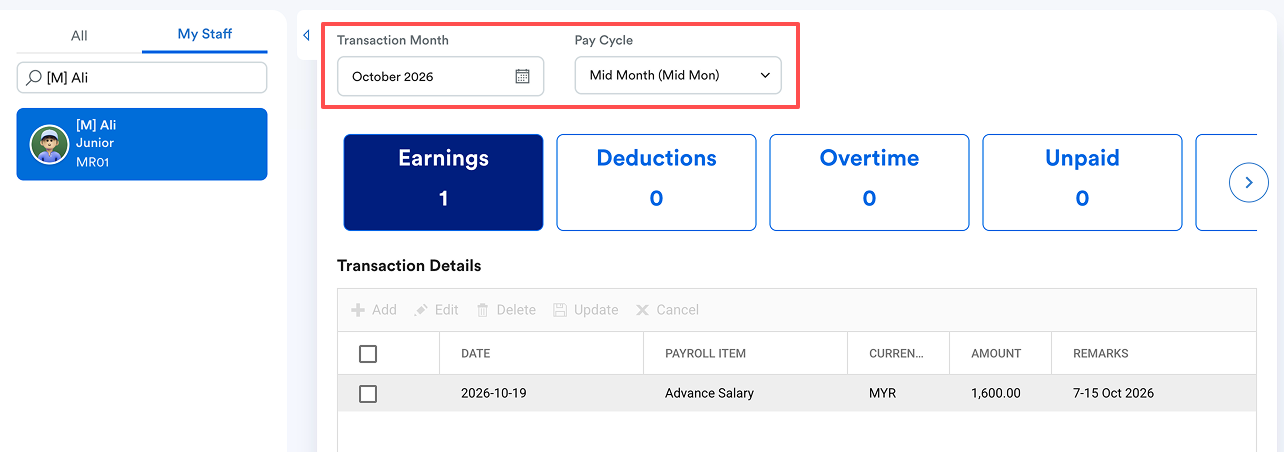
- Manually calculate the salary payable for the eligible period of 7–15 October 2026. Verify the amount before entering it into Worksy, as the system will not automatically calculate the Salary Advance amount for this method.
- Go to Payroll > Transaction > Individual Transaction.
- Select Mid Month pay cycle.
- Select the affected employee(s).
- Add an earning item under Earnings for the manually calculated amount.
- Process the October 2026 Mid Month payroll using the existing Payroll Policy and Pay Cycle.
- Review the generated payslip and verify the salary advance amount before proceeding with payment.
Step 2: Process Month End (ME) Payroll
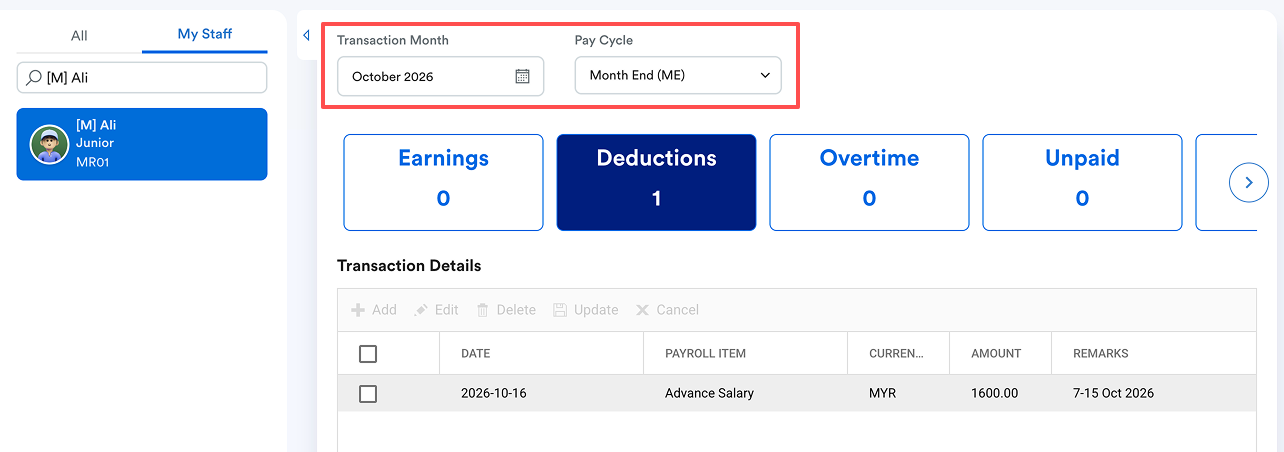
- Go to Payroll > Transaction > Individual Transaction.
- Select Month End pay cycle.
- Select the same employee(s).
- Add a deduction item under Deductions equivalent to the amount already paid during Mid Month payroll.
- Process the Month End payroll.
- Review the generated payslip to ensure the salary advance has been deducted correctly and that no duplicate salary payment occurs.
Important: Statutory Contributions
- Review the statutory settings for the salary advance earning and its corresponding recovery, particularly for EPF, SOCSO, EIS, SKBBK and PCB, where applicable. Verify the statutory calculations across both payroll cycles to avoid incorrect contributions or deductions.
- Review the gross earnings, deductions, statutory calculations and net salary on both payslips before finalizing the payroll.
We hope this explanation clarifies the matter. If you require further assistance, please don't hesitate to contact our support team.
Was this article helpful?
That’s Great!
Thank you for your feedback
Sorry! We couldn't be helpful
Thank you for your feedback
Feedback sent
We appreciate your effort and will try to fix the article