Getting your team to clock in and out has never been easier. Depending on your needs, Worksy offers multiple ways for employees to record their attendance.
If you’re overseeing which clocking methods your employees can use, check out our detailed guide here: How to manage which clocking method staff is able to use?
Clocking Methods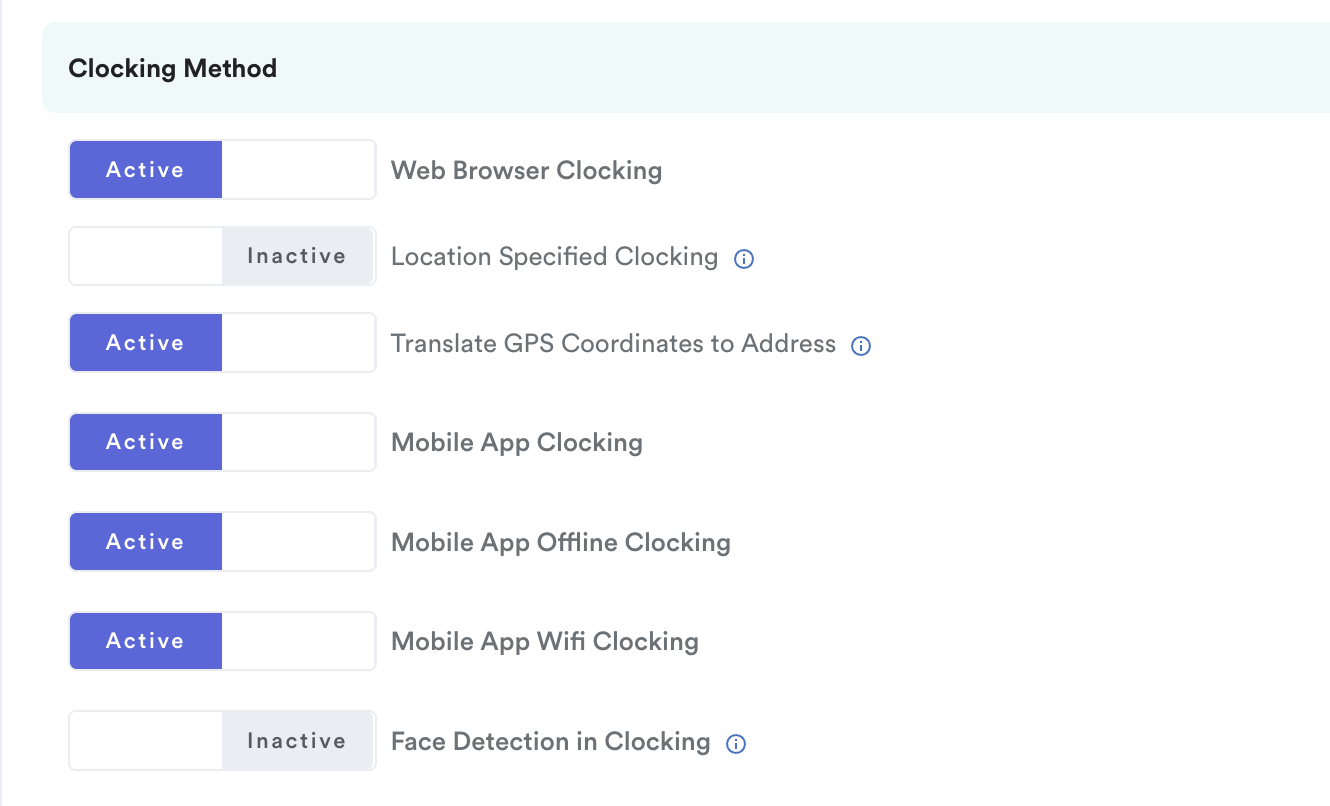
1. Web Browser Clocking
Your employees can clock in directly using their laptop or mobile browser. This method also captures a selfie and their current location, giving you reliable attendance data. For the smoothest experience, we recommend Google Chrome.
2. Location Specified Clocking
If you enable this, employee only can clocking in the assigned locations based on their employee profile, refer to Enable Location Specified Clocking.
3. Standard Mobile App Clocking
Employees can download the Worksy Mobile App from the App Store (iOS) or Google Play Store (Android). Once enabled for their schedule, this option will appear in the app.
To understand the possible clocking errors, refer to Why "You are not allowed to clock-in/ clock-out at this Location" and GPS Location Not Detected When Clocking (Mobile App).
a) WiFi Clocking
This method allows employees to clock in only when they are connected to an approved WiFi network. This is only for both IOS and Android, not for web browser.
When the employee is connected to the configured WiFi network, they will be allowed to clock in and the system will record the intended location automatically. Refer this guide for step-by-step: How to Setup Mobile App WiFi Clocking
b) Offline Clocking with Mobile App

This option allows employees to clock in even without an internet connection. All data will automatically sync with Worksy once the device reconnects.
4. Face Detection
For face detection clocking, the system needs to detect a face to clock-in successfully if you enable camera permission. If you do not have a face detected during clock-in, the system will prompt an error as below.
To enable this to work properly, you need to ensure the whole face is in the center of the frame.
For more self-clocking errors, refer to Common Errors for Self-Clocking with Face Detection.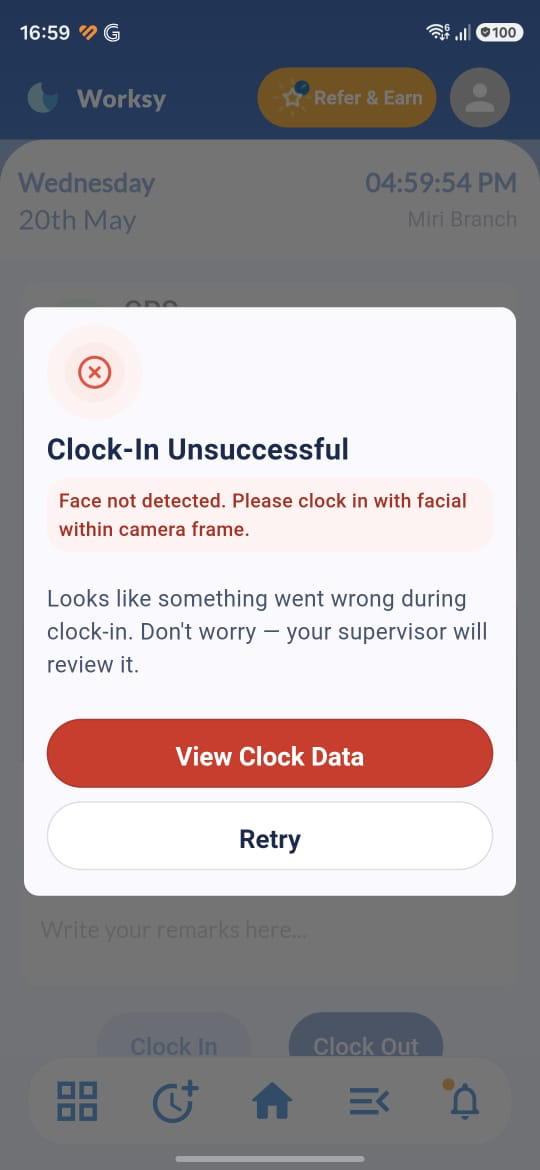
Note: If you disallow camera permission, then the system allows clock-in without a face detected. This is to ensure successful clocking if the camera is broken.
5. Integrated Device Clocking

For organizations using external devices, Worksy can integrate clocking data directly. This setup requires a paid service and includes:
Clock Data Integration
Web API Integration (availability depends on the device)
CSV Integration
We hope this explanation clarifies the matter. If you require additional assistance, do not hesitate to contact our support team.
Was this article helpful?
That’s Great!
Thank you for your feedback
Sorry! We couldn't be helpful
Thank you for your feedback
Feedback sent
We appreciate your effort and will try to fix the article