The payroll cut-off period defines the date range used to pull variable transactions such as unpaid leave, overtime, and claims into your current month's payroll.
How to Change the Cut-Off Period
Read more here: Define Monthly Cut Off in Payroll Policy
TABLE OF CONTENTS
Impact of Changing Payroll Cut-Off Period on Salary Calculations
IMPORTANT: Check for Date Gaps
1. Non-Overlapping Cut-Off Periods
2. Overlapping Periods (Recommended)
Impact of Changing Payroll Cut-Off Period on Salary Calculations
- Fixed Monthly Salary: Changing the cut-off period doesn't change the basic salary amount for monthly-rated employees. It only affects calculation for variable items in Payroll Policy (Overtime, Unpaid Leave, etc.).
- Salary Proration: Proration should only apply to employees joining or resigning between the transition dates of the old and new cut-off periods.
Before finalizing the change for the whole company, we recommend to test run payroll processing for one employee first. Once you have verified that the calculations and transactions are accurate, you may proceed with the rest of the company.
IMPORTANT: Check for Date Gaps
When changing your cut-off dates, it's essential to ensure there are no gaps between the old and new periods. Gaps can result in missing transactions that must be handled manually.
1. Non-Overlapping Cut-Off Periods
If the new cut-off period doesn't immediately follow or overlap with the previous one, transactions occurring in the gap will not be pulled into the payroll automatically.
Example:
| Previous Cut Off Period | New Cut Off Period |
| 26th of the Previous Month – 25th of the Current Month | 1st of the Current Month – 31st of the Current Month |
| 26/03/2026 – 25/04/2026 | 01/05/2026 – 31/05/2026 |
| NOT OVERLAPPED (Gap: 26/04 – 30/04) | |
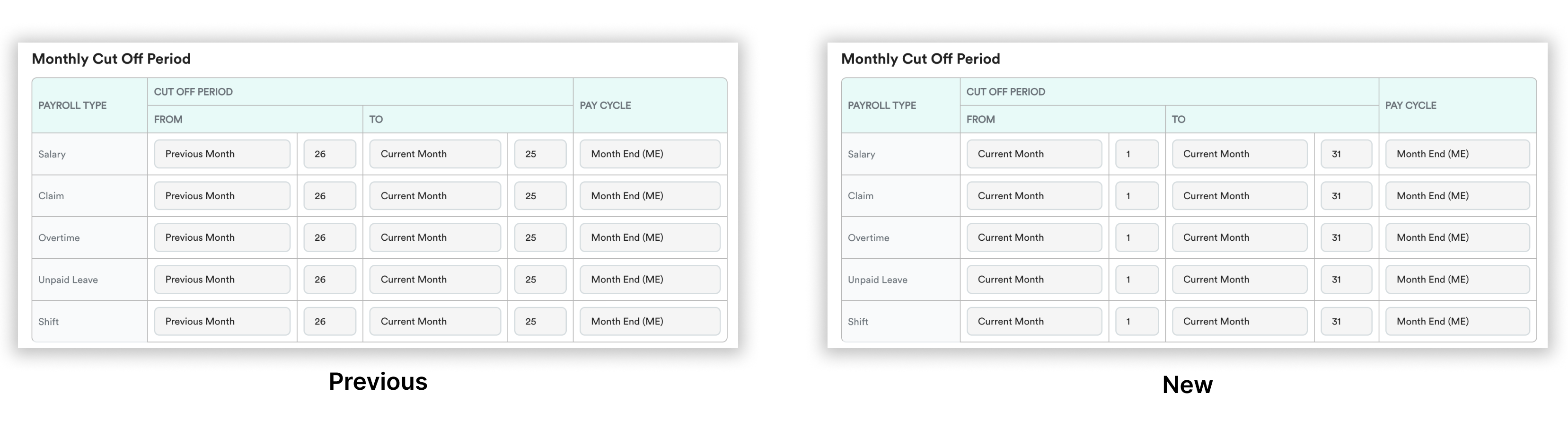
- In this case, unpaid leave or claim during the gap (26/04/2026) won't be included in either the current or previous month’s payroll and will need to be added manually.
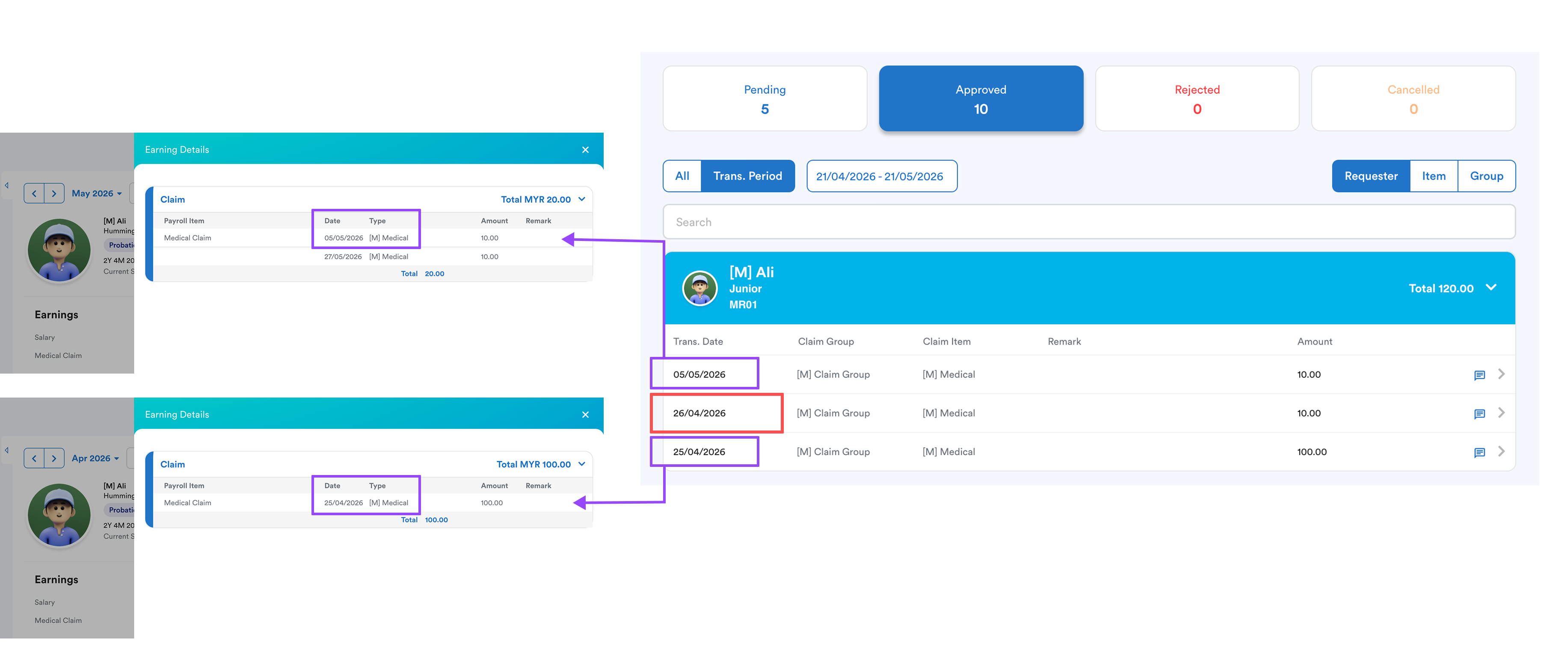
Click to enlarge
- Any unpaid leave or overtime taken between the gap won't appear in payroll. You'll need to add these transactions manually in Individual Transaction.
2. Overlapping Periods (Recommended)
To ensure no data is missed during the transition, your new period must overlap with the previous period.
Example:
| Previous Cut Off Period | New Cut Off Period |
| 21st of the Previous Month – 20th of the Current Month | 16th of the Previous Month – 15th of the Current Month |
| 21/03/2026 – 20/04/2026 | 16/04/2026 – 15/05/2026 |
| OVERLAPPED | |
In Worksy, we have a safety net to ensure that any payroll items already pulled into a payroll will not be included in another payroll. This helps prevent duplication and double payment.
We hope this clarifies the matter. If you require further assistance, do not hesitate to contact our support team.
Was this article helpful?
That’s Great!
Thank you for your feedback
Sorry! We couldn't be helpful
Thank you for your feedback
Feedback sent
We appreciate your effort and will try to fix the article