Worksy calculates EPF contribution based on the EPF Base in your payslip.
"Include in EPF Wage" is the wage used to determine the employer epf contribution of 12 or 13%.
The quick contribution guide used in Worksy is based on the table from KWSP official website.
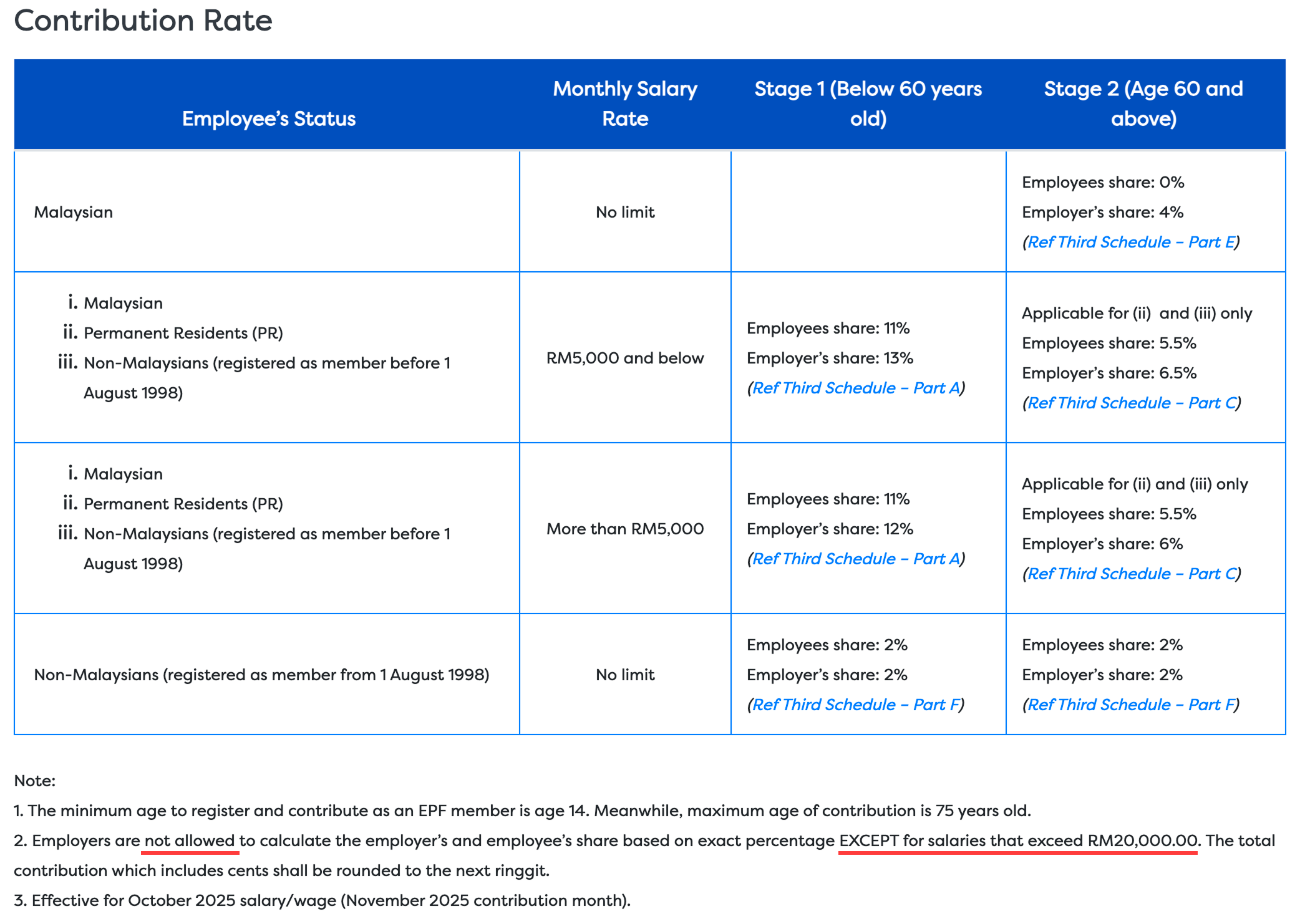
As the above note stated, only salary exceeds RM20,000 will use exact figures to calculate EPF contribution.
Detailed information, kindly refer back to KWSP Jadual Ketiga.
- Rounding: The final contribution amount must be rounded up to the next Ringgit.
- Why Table? Using a table ensures that the rounding is consistent with the law, as simple percentage calculations often result in different figures than those required by the EPF.
Categories follow the table range:
Row 1 - Malaysian over 60yrs; (Bahagian E)
Row 2 - RM5000 and below for Malaysian /PR/ Non-Malaysian before 1 Aug 1998;
Row 3 - RM5001 and above for Malaysian /PR/ Non-Malaysian before 1 Aug 1998;
2. Direct Percentage Approach
Foreign Workers: As of October 2025, a new rule applies where the contribution for non-Malaysian citizens is calculated at a 2% employee rate and 2% employer rate, which is a fixed percentage method. (Bahagian F)
Earning with Bonus > 5k: If a bonus pushes the total monthly remuneration above RM5,000, the employer must still contribute 13% for that month; there is no table range in Jadual 3, so Worsky will use the direct percentage calculation of the exact EPF base.
Wages exceed RM20,000: For salaries exceeding RM20,000.00 in a particular month, the contribution is calculated based on an exact percentage (11% employee / 12% employer) rather than the table.
Important Notes
- Total Sums: Total contributions (employer + employee) must be in ringgit denominations and rounded up to the next ringgit.
Quick Links:
How to view EPF Base in Payroll Review?
Refer to Examples of EPF Contribution
Side Note: The General Rule of Thumb for Employer (ER) Contribution
What is EPF Base?
This EPF Base accumulates from your earnings payroll item that has been flagged for EPF as below. To create a payroll item, refer to Creating/Edit Payroll Items.

How to view EPF Base in Payroll Review?
Navigate to Payroll > Payroll Review > Individual Payroll to select an employee name and scroll down to view the statutory base.

The Bonus Exception Rule
- Rule: If an employee’s regular wages are RM5,000 or below, the employer must contribute 13%.
- Exception: If a bonus pushes the total pay for that month above RM5,000, the employer contribution rate remains at 13% for that entire amount.
- Contrast: If the employee's regular wages were already above RM5,000 (without the bonus), the employer rate would be 12%.
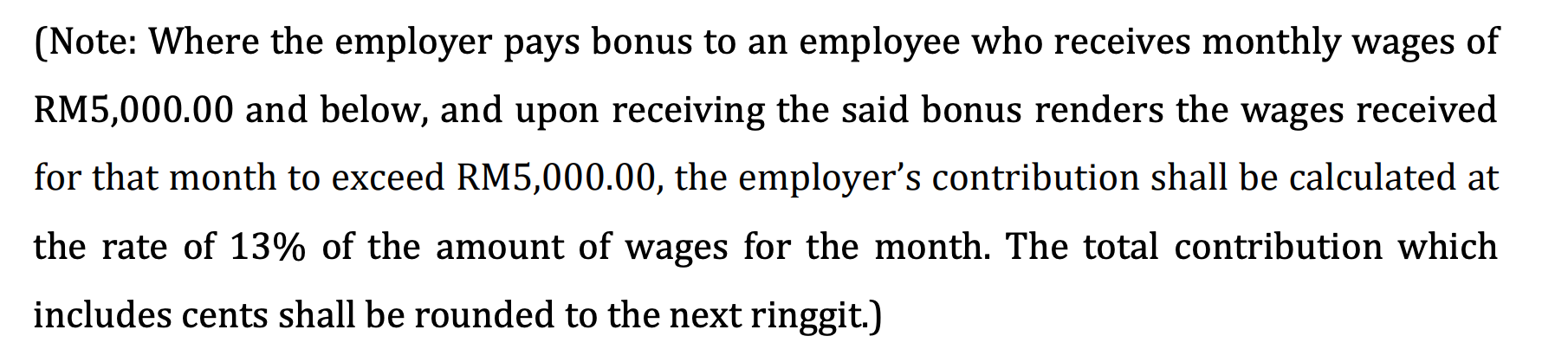
Refer to EPF Calculation For Two Payroll Cycles in a Month (with bonus) for an example of bonus epf contribution.
Side Note: The General Rule of Thumb for Employer (ER) Contribution
We hope this explanation clarifies the matter. If you require further assistance, please don't hesitate to contact our support team.
Was this article helpful?
That’s Great!
Thank you for your feedback
Sorry! We couldn't be helpful
Thank you for your feedback
Feedback sent
We appreciate your effort and will try to fix the article