When configuring a leave type's Entitlement Policy, you can define leave entitlements based on either an employee's Year of Service or Month of Service (MOS).
Leave entitlement based on Month of Service cannot be prorated. Once an employee reaches the configured Month of Service, the system grants the full entitlement for that tier.
The Entitlement by Month(s) option allows you to assign different leave entitlement amounts according to an employee's completed Month of Service.
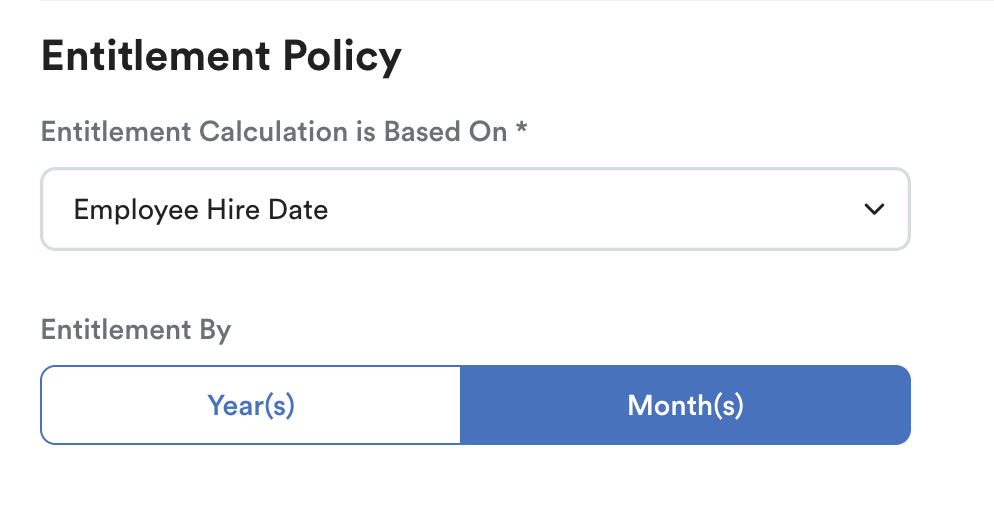
Path: Settings > Leave > Leave Type > Entitlement Policy
The system checks the employee's current MOS and grants the entitlement configured for the matching tier.
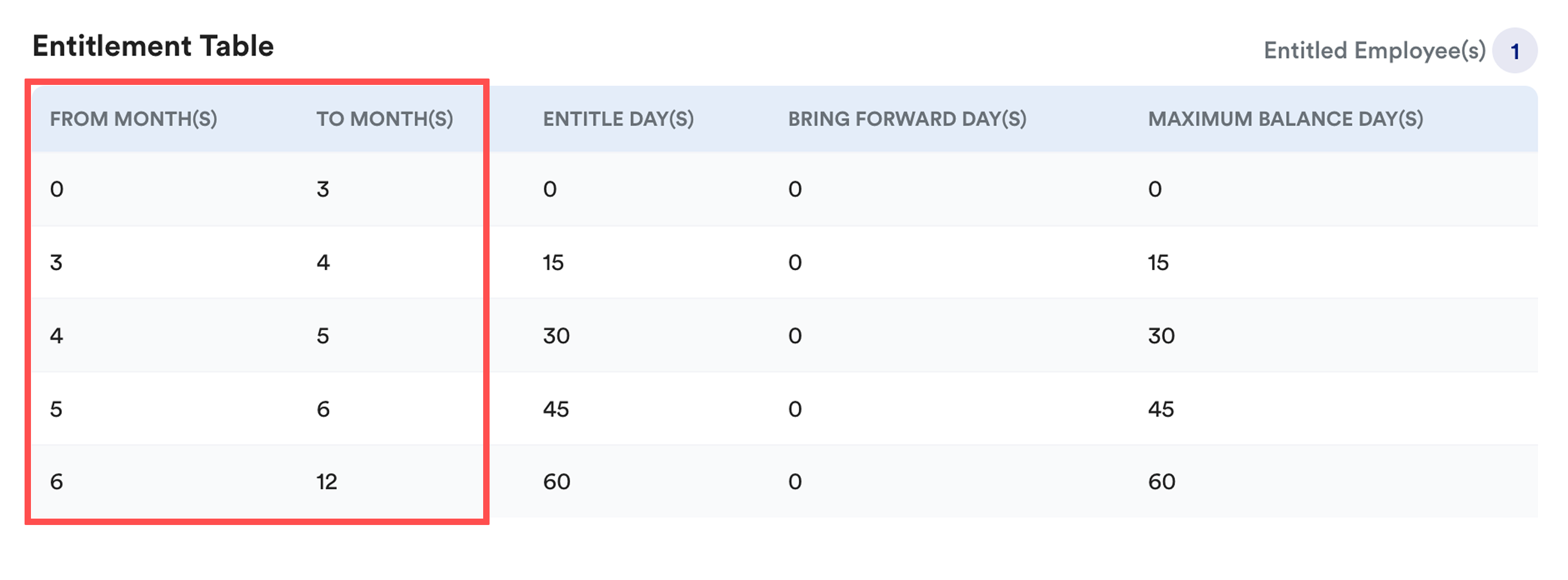
The Entitlement by Month(s) option is available when the Entitlement Calculation is set to:
- Calendar Month
- Calendar Year
- Employee Hire Date
The option is not available when Entitlement Calculation is set to Employee Anniversary Year. Learn more: Leave Entitlement Calculation Method
Note:
- The Leave Earning Method is not applicable when this option is used. Entitlement by Month(s) supports one-off leave entitlements only, no proration.
- Example: Ali reaches 8.6 months of service; according to the entitlement table above, he will get 60 days full entitlement without proration.
How Month of Service is determined
The employee's Month of Service (MOS) is calculated based on the employee's completed months of service when the entitlement is generated.
Entitlement Calculation Method | Year of Service (YOS) | Month of Service (MOS) |
|---|---|---|
Calendar Year | Uses the calendar year as the entitlement period (1 January – 31 December). | Employee's completed months of service as of the last day of the current month. |
Employee Hire Date | From the hire date until one day before the next anniversary. | Employee's completed months of service as of the first day of the current month. |
Calendar Month | Uses the selected entitlement month as the start of the entitlement period, which runs for 12 months. |
Example
Assume the following entitlement policy is configured:
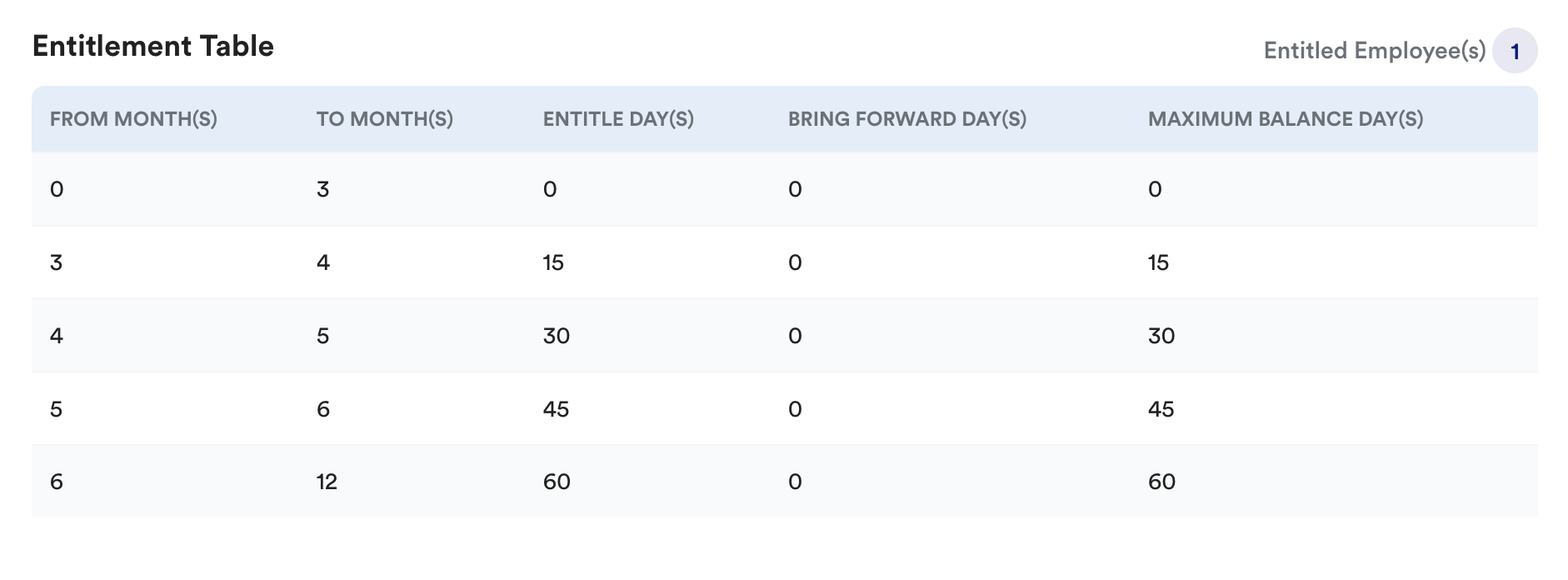
- Hire Date: 10 Jan 2026
- Current Date: 28 Jul 2026
Entitlement Calculation Method | MOS Reference Date | Completed MOS | Entitled Day(s) |
|---|---|---|---|
Calendar Year | 31 Jul 2026 | 6 months | 60 days |
Employee Hire Date | 1 Jul 2026 | 5 months | 45 days |
Calendar Month | 1 Jul 2026 | 5 months | 45 days |
Calculation Breakdown for Calendar Year
MOS Reference Date: 31 Jul 2026 (system calculates up to last day of the current month)
Completed monthly anniversaries:
- 10 Feb = 1 month
- 10 Mar = 2 months
- 10 Apr = 3 months
- 10 May = 4 months
- 10 Jun = 5 months
- 10 Jul = 6 months
Calculation Breakdown for Employee Hire Date & Calendar Month
MOS Reference Date: 1 Jul 2026 (system calculates up to the first day of the current month)
Completed monthly anniversaries:
- 10 Feb = 1 month
- 10 Mar = 2 months
- 10 Apr = 3 months
- 10 May = 4 months
- 10 Jun = 5 months
- 10 Jul = Not reached
We hope this explanation clarifies the matter. If you require additional assistance, do not hesitate to contact our support team.
Was this article helpful?
That’s Great!
Thank you for your feedback
Sorry! We couldn't be helpful
Thank you for your feedback
Feedback sent
We appreciate your effort and will try to fix the article